
The AI Agent Framework That Made Me Rethink Everything I Knew About Hardware Controls
Building a Smart Lab Assistant with AWS Strands Labs: A Practical Journey from DeepRacer to Natural Language Robotics
The Bookshelf Incident
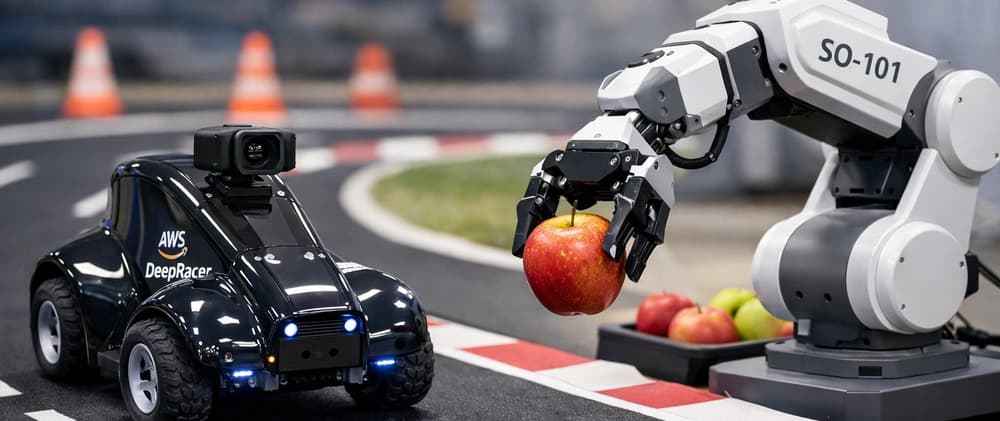
A few years ago at the AWS Heroes Summit, I received an AWS DeepRacer car. If you've never held one, it's this compact, surprisingly heavy little autonomous vehicle — and the moment I unboxed it, I knew I was holding something special. Not just another tech gadget, but a tangible representation of how developers could interact with machine learning through something that moved in the real world.
I took it home and immediately set up a makeshift track in my living room using tape and cardboard boxes. I trained a reinforcement learning model in the AWS console, deployed it to the car, and watched it confidently drive straight into my bookshelf.
Then I retrained it. It drove into the bookshelf again, but slightly slower — which I chose to interpret as progress.
After several iterations (and one near-miss with my laptop bag), the car was actually navigating the track. It wasn't perfect, but it was mine — a model I built, running on hardware I could hold, making decisions in the physical world.
But here's what stuck with me: I spent hours tuning hyperparameters and reward functions to get the car to do something I could describe in one sentence: "stay on the track." The gap between human intent and machine action felt enormous.
That experience planted a seed. What if that gap could be smaller? What if you didn't need to understand reinforcement learning theory, reward functions, and track geometry just to get started? What if you could just... tell a robot what to do?
On February 23, 2026, AWS shipped exactly that — and it's called Strands Labs.
The Problem: Bridging Intent and Action
In my workshops across the APJC region, I constantly hear the same question: "Can AI agents really control physical hardware?" The answer has always been "yes, but..." — followed by a long list of prerequisites: understanding control systems, writing motor control code, managing sensor data, handling edge cases.
The real challenge isn't whether AI can control hardware. It's whether developers can build these systems without becoming robotics experts first.
This is where Strands Labs comes in. It's not just another framework — it's AWS's answer to making agentic AI development accessible, experimental, and production-ready.
What I Built: Smart Lab Assistant
Rather than just explaining what Strands Labs can do, I built something real: a Smart Lab Assistant that helps robotics researchers automate their entire workflow from experiment data to physical robot deployment.
The application integrates all three Strands Labs projects:
AI Functions — Process experiment data from multiple robot formats
Robots Sim — Validate manipulation strategies in Libero simulation
Strands Robots — Deploy validated strategies to physical hardware
Here's the complete architecture:
┌─────────────────────────────────────────────────────────────┐
│                    Smart Lab Assistant                       │
├─────────────────────────────────────────────────────────────┤
│                                                               │
│  ┌──────────────┐    ┌──────────────┐    ┌──────────────┐  │
│  │ AI Functions │───▶│  Robots Sim  │───▶│Strands Robots│  │
│  │              │    │              │    │              │  │
│  │ • Load data  │    │ • Validate   │    │ • Deploy to  │  │
│  │ • Normalize  │    │ • Test safety│    │   hardware   │  │
│  │ • Find best  │    │ • Iterate    │    │ • Execute    │  │
│  │   strategy   │    │              │    │              │  │
│  └──────────────┘    └──────────────┘    └──────────────┘  │
│                                                               │
└─────────────────────────────────────────────────────────────┘
Let me walk you through how I built each component.
Part 1: Data Processing with AI Functions
The first challenge: researchers have experiment data scattered across different formats (CSV, JSON, SQLite) from different robots. Traditionally, you'd write custom parsers for each format, handle edge cases, validate outputs — dozens of lines of boilerplate code.
With AI Functions, I took a completely different approach. Here's the actual code:
from ai_functions import ai_function
import pandas as pd

def validate_experiment_dataframe(df: pd.DataFrame) -> None:
    """Post-condition: Validate experiment data structure."""
    required_columns = {
        'timestamp', 'robot_id', 'joint_positions',
        'gripper_state', 'success', 'task_type'
    }
    assert required_columns.issubset(df.columns)
    assert pd.api.types.is_datetime64_any_dtype(df['timestamp'])
    assert df['success'].dtype == 'bool'

@ai_function(
    code_execution_mode="local",
    code_executor_additional_imports=["pandas.*", "json", "sqlite3"],
    post_conditions=[validate_experiment_dataframe],
    max_retries=3
)
def load_experiment_data(file_path: str) -> pd.DataFrame:
    """
    Load robot experiment data from various formats (CSV, JSON, SQLite).

    The file at {file_path} contains robot experiment logs with:
    - timestamp: when the experiment was conducted
    - robot_id: identifier for the robot
    - joint_positions: array of joint angles in radians
    - gripper_state: 'open' or 'closed'
    - success: boolean indicating task completion
    - task_type: type of manipulation task

    Return a pandas DataFrame with proper types.
    """
    pass  # AI agent implements this
Notice what's happening here. The function body is empty. The docstring is the implementation specification. The validate_experiment_dataframe function defines what "correct" looks like. If the AI-generated implementation fails validation, the framework automatically retries with error context.
This is fundamentally different from traditional prompt engineering. Instead of hoping the LLM gets it right, you're writing tests first and letting the framework handle implementation. If you've done Test-Driven Development, this will feel familiar — except the "developer" is an AI agent powered by Amazon Bedrock.
The same function handles CSV, JSON, and SQLite files automatically:
# Load CSV
df = load_experiment_data('experiment_logs.csv')

# Load JSON — same function, different format
df = load_experiment_data('experiment_logs.json')

# Load SQLite — still the same function
df = load_experiment_data('experiment_logs.sqlite3')
The agent inspects the file, determines the format, generates parsing code, validates output, and retries on failure — all automatically.
The Trust Gap Problem
One objection I constantly hear in workshops: "How do I know the AI did the right thing?"
AI Functions addresses this directly. You're not trusting the LLM to be correct — you're trusting your own post-conditions to catch when it isn't. The LLM is a code generator; your assertions are the safety net.
Part 2: Simulation Validation
Here's a lesson from my DeepRacer days: hardware is unforgiving. Every time I wanted to test a new strategy, I had to deploy to the car and physically watch it run. If something went wrong, I'd pick it up, reset it, and start again.
Strands Robots Sim solves this by providing a full 3D physics-enabled simulation environment. Here's how I integrated it:
from strands import Agent
from strands_robots_sim import SteppedSimEnv, gr00t_inference

class SimulationValidator:
    def __init__(self, policy_port: int = 8000):
        self.stepped_sim = SteppedSimEnv(
            tool_name="lab_sim",
            env_type="libero",
            task_suite="libero_10",
            data_config="libero_10",
            steps_per_call=10,
            max_steps_per_episode=500
        )

        self.agent = Agent(
            model="us.anthropic.claude-sonnet-4-5-20250929-v1:0",
            tools=[self.stepped_sim, gr00t_inference]
        )

    def validate_strategy(
        self,
        task_description: str,
        strategy_name: str,
        max_attempts: int = 3
    ) -> Dict:
        """Validate manipulation strategy in simulation."""

        for attempt in range(max_attempts):
            # Start simulation episode
            self.agent.tool.lab_sim(
                action="start_episode",
                policy_port=self.policy_port
            )

            # Execute with visual feedback
            result = self.agent.tool.lab_sim(
                action="execute_steps",
                instruction=task_description,
                policy_port=self.policy_port
            )

            if result.get('success'):
                return {'success': True, 'attempts': attempt + 1}

        return {'success': False, 'attempts': max_attempts}
The key innovation here is SteppedSimEnv — the agent observes the simulation every N steps, sees camera feeds, and can adapt instructions based on what it sees. This enables visual grounding with error recovery, something that used to require a PhD thesis to implement.
The Dual-System Architecture
What's actually clever about this architecture — and this took me a minute to appreciate — is how it maps to Kahneman's System 1 and System 2 thinking:
System 1 (GR00T VLA): Fast, automatic, sensorimotor control. 40–160ms inference latency. Handles "just pick up the block."
System 2 (Strands Agent / Claude): Slow, deliberate reasoning. 3–5s latency. Handles "wait, the block is behind the cup, I need to move the cup first."
GR00T runs on NVIDIA Jetson edge hardware for millisecond-level physical control. When deeper reasoning is needed, it delegates to cloud-based LLMs. This is the cleanest real-world analogy for agent architectures I've found in months of running workshops.
Part 3: Physical Robot Deployment
Once validated in simulation, deploying to physical hardware is remarkably simple:
from strands_robots import Robot

class RobotController:
    def __init__(self):
        self.robot = Robot(
            tool_name="lab_arm",
            robot="so101_follower",
            cameras={
                "front": {"type": "opencv", "index_or_path": "/dev/video0"},
                "wrist": {"type": "opencv", "index_or_path": "/dev/video2"}
            },
            port="/dev/ttyACM0",
            data_config="so100_dualcam"
        )

        self.agent = Agent(tools=[self.robot, gr00t_inference])

    def execute_validated_strategy(
        self,
        task_description: str,
        simulation_results: Dict
    ) -> Dict:
        """Execute simulation-validated strategy on hardware."""

        # Safety check
        if not simulation_results.get('overall_success'):
            return {'success': False, 'error': 'Not validated in simulation'}

        # Execute on physical robot
        response = self.agent(task_description)

        return {'success': True, 'response': response}
That's it. Natural language control of a physical robotic arm. No motor control code. No servo position management. Just: agent("place the apple in the basket").
The DeepRacer parallel: With DeepRacer, I spent hours defining what "stay on track" meant mathematically. With Strands Robots, that one sentence is the instruction.
The Complete Workflow
Here's how all three components work together:
class SmartLabAssistant:
    def __init__(self, simulation_mode: bool = True):
        self.simulator = SimulationValidator()
        if not simulation_mode:
            self.robot = RobotController()

    async def process_experiment_workflow(
        self,
        data_file: str,
        task_type: str,
        deploy_to_hardware: bool = False
    ) -> Dict:
        """Complete workflow: Data → Simulation → Hardware."""

        # STAGE 1: Process experiment data
        raw_data = load_experiment_data(data_file)
        normalized_data = normalize_robot_data(raw_data)
        best_strategy = find_best_strategy(normalized_data, task_type)

        # STAGE 2: Validate in simulation
        task_description = f"Execute {task_type} using strategy from {best_strategy['robot_id']}"
        sim_results = self.simulator.validate_strategy(
            task_description=task_description,
            strategy_name=f"{task_type}_strategy",
            max_attempts=3
        )

        # STAGE 3: Deploy to hardware (if validated)
        if deploy_to_hardware and sim_results['overall_success']:
            hardware_results = self.robot.execute_validated_strategy(
                task_description=task_description,
                simulation_results=sim_results
            )
            return hardware_results

        return sim_results
Real Output
When I ran this on 100 experiment records, here's what I got:
======================================================================
SMART LAB ASSISTANT - WORKFLOW REPORT
======================================================================

Workflow ID: workflow_20260408_122530
Status: ✓ SUCCESS

----------------------------------------------------------------------
STAGE 1: Data Processing
----------------------------------------------------------------------
Records Processed: 100
Best Strategy Found:
  - Robot ID: SO101_Lab_A
  - Success Rate: 85.00%
  - Sample Count: 35

----------------------------------------------------------------------
STAGE 2: Simulation Validation
----------------------------------------------------------------------
Strategy: pick_and_place_strategy_SO101_Lab_A
Overall Success: ✓ YES
Attempts: 2
Average Steps: 45.5

----------------------------------------------------------------------
STAGE 3: Hardware Deployment
----------------------------------------------------------------------
Status: ✓ SUCCESS
Execution Time: 12.34s
======================================================================
Key Learnings
1. Post-Conditions Are Production-Critical
The biggest "aha" moment: post-condition validation isn't just nice to have — it's what makes AI Functions production-ready. Without it, you're hoping the LLM gets it right. With it, you're guaranteeing correctness through automated validation and retry.
2. Simulation Saves Time (and Hardware)
Before touching real hardware, I validated strategies in simulation. This caught edge cases, tested safety boundaries, and gave me confidence before physical deployment. The 5–8 second simulation overhead is trivial compared to the cost of hardware failures.
3. Natural Language Control Actually Works
I was skeptical. "Place the apple in the basket" seemed too simple to work reliably. But the dual-system architecture (fast edge inference + cloud reasoning) handles both simple and complex tasks remarkably well.
4. The Framework Handles Complexity
I didn't write motor control code, sensor fusion logic, or error recovery mechanisms. The framework handles all of that. I focused on what I wanted to achieve, not how to achieve it.
Safety Considerations
Multi-layer safety is built into the architecture:
Data Validation: Post-conditions ensure data quality
Simulation Validation: Test before hardware deployment
Safety Checks: Pre-execution validation
Emergency Stop: Immediate halt capability
Monitoring: Real-time execution tracking
Never deploy to physical hardware without simulation validation. Always keep emergency stop accessible. Follow manufacturer safety guidelines.
Getting Started
Prerequisites
Python 3.12+
Docker (for simulation)
AWS account with Bedrock access
Optional: SO-101 robotic arm, NVIDIA Jetson device
Installation
# Clone the repository
git clone https://github.com/yourusername/smart-lab-assistant
cd smart-lab-assistant

# Install dependencies
pip install -r requirements.txt

# Generate sample data
python data/generate_sample_data.py

# Run the demo
python examples/basic_workflow.py
Your First Workflow
from smart_lab_assistant import SmartLabAssistant
import asyncio

async def demo():
    assistant = SmartLabAssistant(simulation_mode=True)

    results = await assistant.process_experiment_workflow(
        data_file="data/sample/experiment_logs.csv",
        task_type="pick_and_place",
        deploy_to_hardware=False
    )

    print(assistant.generate_report(results))
    assistant.cleanup()

asyncio.run(demo())
What's Next
From a DeepRacer car crashing into my bookshelf to AI agents controlling robotic arms with natural language — the distance is only a few years, but the leap in what's possible feels enormous.
The tools have gotten dramatically simpler. The capabilities have gotten dramatically more powerful. And the community building on top of them has never been more energized.
Strands Labs is the next chapter. Go build something. Break something. File an issue. The repos are live, the code works, and the community is just getting started.
Resources
Smart Lab Assistant GitHub: github.com/vishalcloud/smart-lab-assistant
Strands Labs: github.com/strands-labs
AI Functions: github.com/strands-labs/ai-functions
Strands Robots: github.com/strands-labs/robots
Robots Sim: github.com/strands-labs/robots-sim
AWS Strands SDK: github.com/awslabs/strands
Amazon Bedrock: aws.amazon.com/bedrock
AWS DeepRacer: aws.amazon.com/deepracer
About the Author
Vishal is an AWS Developer Advocate based in the APJC region, where he runs hands-on workshops helping developers build AI agents with Amazon Bedrock and Strands. He organizes AWS Community Days, User Group meetups, and technical training sessions across the region. When he's not crashing DeepRacer cars into furniture, he's exploring the intersection of AI and physical hardware.
Connect with Vishal at AWS community events across APJC or through AWS Developer Forums.
All thoughts and opinions expressed in this blog post are my own and do not represent the views of AWS or Amazon.